A Detailed, Informative & Authoritative User Guide for ICICI Bank Customers
Digital banking in India has evolved rapidly, and ICICI Bank iMobile stands out as one of the most advanced, feature-rich, and user-friendly mobile banking apps in the country. Designed to meet the needs of savings account holders, current account customers, students, salaried professionals, NRIs, senior citizens, and business users, the iMobile app brings the entire ICICI Bank branch experience to your smartphone.
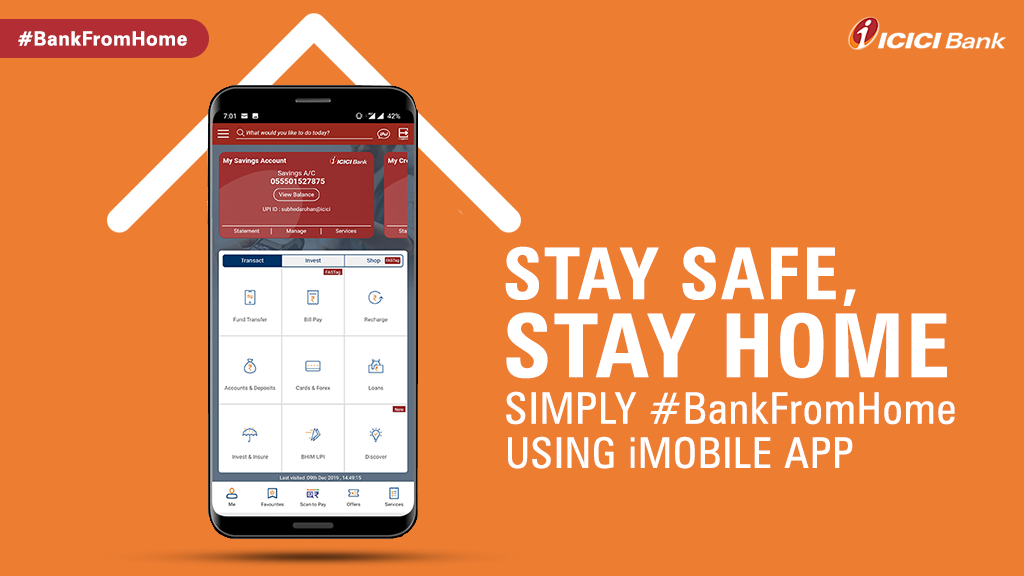
This in-depth guide explains everything you need to know about the iMobile App by —from installation and registration to fund transfers, UPI, investments, loans, cards, security, and troubleshooting—so you can use the app confidently and efficiently.
What is ICICI Bank iMobile App?
The iMobile App is ICICI Bank’s official mobile banking application that enables customers to manage banking, payments, investments, loans, and lifestyle services through a single secure platform.
Unlike basic banking apps, iMobile is designed as a digital financial hub, offering not just transactions but also wealth management, credit services, tax payments, insurance, travel bookings, and bill payments—all integrated into one app.
Who Can Use ICICI iMobile?
The iMobile app is suitable for:
- ICICI Bank savings & current account holders
- Salary account customers
- NRI account holders
- Students and first-time banking users
- Senior citizens
- Loan and credit card customers
- Business owners and professionals
Even non-ICICI customers can access limited services and explore products such as loans, credit cards, and investment options.
Key Features of ICICI Bank iMobile App
1. Core Banking Services
- Account balance & transaction history
- Detailed account statements (PDF download)
- Cheque book request & stop cheque
- Nominee management
2. Fund Transfers
- ICICI to ICICI transfers
- NEFT / RTGS / IMPS
- International remittances (select users)
- Scheduled & recurring transfers
3. UPI Payments
- Scan & Pay QR codes
- Send/receive money via UPI ID or mobile number
- Bill splitting & collect requests
4. Cards & Payments
- Debit card & credit card management
- Card limit control
- International usage enable/disable
- Credit card bill payments
5. Deposits & Investments
- Fixed Deposits (FD)
- Recurring Deposits (RD)
- Mutual Funds
- SIP investments
- PPF & tax-saving products
6. Loans & Credit
- Personal loans
- Home loans
- Car loans
- Pre-approved instant loans
- Credit card applications
7. Lifestyle & Utility Services
- Bill payments & recharges
- FASTag recharge
- Tax payments
- Travel & insurance services
How to Download ICICI iMobile App
For Android Users
- Open Google Play Store
- Search “ICICI Bank iMobile”
- Verify the developer as ICICI Bank
- Tap Install
For iPhone Users
- Open Apple App Store
- Search “iMobile by ICICI Bank”
- Tap Get
⚠️ Security Tip: Download only from official app stores. Never use APK files or third-party links.
Prerequisites Before Registration
To register on iMobile, ensure:
- Active ICICI Bank account
- Mobile number registered with the bank
- Debit card details available
- Stable internet connection
ICICI iMobile Registration – Step-by-Step
Step 1: Launch the App
- Open iMobile
- Tap Login / Register
Step 2: Enter Mobile Number
- Enter your registered mobile number
- Verify using OTP
Step 3: Account Verification
- Enter debit card details or account details (as prompted)
Step 4: Create Login Credentials
- Set a User ID
- Create a strong login password
Step 5: Set iMobile PIN
- Create a 4-digit or 6-digit PIN
- Enable biometric login (optional)
Registration is now complete 🎉
ICICI iMobile Login Process
- Open the iMobile app
- Enter User ID
- Authenticate using:
- iMobile PIN
- Fingerprint / Face ID
Understanding the iMobile Dashboard
The dashboard gives quick access to:
- Account balances
- UPI & payments
- Cards & loans
- Investments
- Offers & alerts
The design focuses on speed, clarity, and minimal taps.
Account Management on iMobile
Check Account Balance
- Login → Accounts
- View available & ledger balance instantly
Download Account Statement
- Accounts → Statements
- Choose date range
- Download PDF or email statement
Fund Transfer Using ICICI iMobile (Complete Guide)
Add Beneficiary
- Payments → Manage Beneficiary
- Enter account number & IFSC
- Verify via OTP
- Beneficiary activated (as per bank policy)
Transfer Money
- Payments → Fund Transfer
- Select beneficiary
- Enter amount
- Confirm with iMobile PIN
Supported modes:
- IMPS (instant)
- NEFT
- RTGS
ICICI iMobile UPI – Step-by-Step Guide
Activate UPI
- Open UPI
- Create UPI ID
- Set UPI PIN
Use UPI
- Scan QR codes
- Send money via mobile number/UPI ID
- Request money
Fixed Deposit & RD on iMobile
Open Fixed Deposit
- Deposits → Open FD
- Enter amount & tenure
- Confirm instantly
Open Recurring Deposit
- Deposits → Open RD
- Set monthly amount
- Auto-debit enabled
Loans on ICICI iMobile
Apply for Loan
- Loans → Choose loan type
- Check eligibility
- Upload documents
- Instant approval (for eligible users)
Debit & Credit Card Services
- Block/unblock card
- Change transaction limits
- Enable international usage
- Pay credit card bills
- Convert spends to EMI
Bill Payments & Recharges
Pay:
- Electricity, gas, water bills
- Mobile & DTH recharge
- FASTag
- Credit card bills
Set AutoPay to avoid missed payments.
Security Features of ICICI iMobile
- Two-factor authentication
- Device binding
- End-to-end encryption
- Biometric login
- Auto logout on inactivity
Safety Tips
- Never share OTP or PIN
- Avoid public Wi-Fi
- Keep app updated
Common Issues & Troubleshooting
OTP Not Received
- Check network
- Restart phone
- Retry after some time
App Not Opening
- Update app
- Clear cache
- Reinstall if needed
Failed Transaction
- Amount usually reversed automatically
- Check transaction history
iMobile vs Traditional Banking
| Feature | Branch Banking | iMobile App |
|---|---|---|
| Availability | Limited hours | 24×7 |
| Speed | Slow | Instant |
| Paperwork | High | Minimal |
| Convenience | Low | Very High |
Common FAQs on ICICI Bank iMobile App.
These comprehensive FAQs on the ICICI Bank iMobile App are designed to answer common, technical, and practical questions from customers. They are ideal for blogs, help sections, SEO pages, and customer education portals.
1. What is the ICICI Bank iMobile App?
The iMobile App is the official mobile banking application of . It allows customers to perform banking, payments, investments, loan management, and lifestyle services securely using a smartphone, without visiting a bank branch.
2. Who can use the ICICI iMobile App?
The iMobile app can be used by:
- ICICI Bank savings account holders
- Current account customers
- Salary account holders
- NRI customers
- Loan and credit card customers
- Students, professionals, and senior citizens
Non-ICICI customers can also access limited features such as product exploration and loan or credit card applications.
3. Is ICICI iMobile App free to use?
Yes, downloading and using the ICICI iMobile app is completely free. However, normal bank charges may apply for certain services such as NEFT/RTGS transactions, SMS alerts, or international remittances, as per ICICI Bank’s schedule of charges.
4. How do I register on the ICICI iMobile App?
To register on iMobile, you need:
- An active ICICI Bank account
- A mobile number registered with the bank
- ICICI debit card or account details
Registration involves OTP verification, identity confirmation, and setting a User ID, password, and iMobile PIN.
5. Can I use iMobile without a debit card?
In most cases, a debit card is required for full registration. However, certain customers may be allowed alternative verification methods depending on account type and bank policy.
6. What should I do if my registered mobile number has changed?
If your registered mobile number is inactive or changed, you must update your mobile number at an ICICI Bank branch or through approved channels before using iMobile fully.
7. How do I login to the ICICI iMobile App?
You can log in using:
- User ID and iMobile PIN
- Biometric authentication (fingerprint or Face ID, if enabled)
8. What is the iMobile PIN?
The iMobile PIN is a secure numeric PIN used to:
- Log in to the app
- Authorize transactions
It should never be shared with anyone, including bank staff.
9. Can I reset my iMobile PIN or password?
Yes. If you forget your PIN or password:
- Use the “Forgot PIN” or “Forgot Password” option
- Verify your identity using OTP and debit card/account details
- Set a new PIN or password
10. What banking services are available on ICICI iMobile?
You can access:
- Account balance and transaction history
- Account statements (PDF download)
- Cheque book requests
- Stop cheque instructions
- Nominee management
11. What types of fund transfers are supported?
ICICI iMobile supports:
- ICICI to ICICI transfers
- IMPS (instant transfer)
- NEFT
- RTGS
- Scheduled and recurring transfers
12. How do I add a beneficiary in iMobile?
Steps:
- Open Payments → Manage Beneficiary
- Enter beneficiary account number and IFSC
- Verify using OTP
- Beneficiary is activated after bank-defined cooling period (if applicable)
13. Does ICICI iMobile support UPI?
Yes. The app has an integrated UPI feature that allows:
- Scan & Pay QR codes
- Send and receive money using UPI ID or mobile number
- Collect money requests
14. Is ICICI iMobile safe and secure?
Yes. ICICI iMobile uses:
- End-to-end encryption
- Two-factor authentication
- Device binding
- iMobile PIN and biometric security
- Automatic logout on inactivity
When used correctly, it is considered highly secure.
15. What should I do if the iMobile app is not opening?
Try the following:
- Check internet connectivity
- Update the app
- Clear app cache
- Restart your phone
- Reinstall the app
If the problem persists, contact ICICI Bank customer support.
16. Can I open Fixed Deposits (FD) or Recurring Deposits (RD) through iMobile?
Yes. Customers can:
- Open Fixed Deposits
- Open Recurring Deposits
- View, renew, or close deposits
All without visiting a branch.
17. Can I apply for loans using the ICICI iMobile App?
Yes. You can apply for:
- Personal loans
- Home loans
- Car loans
- Education loans
- Pre-approved instant loans (for eligible customers)
18. How can I check my loan details on iMobile?
Login → Loans → Select your loan account to view:
- Outstanding balance
- EMI schedule
- Interest details
19. Can I manage my debit and credit cards on iMobile?
Yes. You can:
- Block or unblock cards
- Set transaction limits
- Enable or disable international usage
- Pay credit card bills
- Convert credit card spends to EMI
20. Does iMobile allow bill payments and recharges?
Yes. You can pay:
- Electricity, gas, and water bills
- Mobile and DTH recharges
- FASTag recharges
- Credit card bills
You can also enable AutoPay for recurring bills.
21. Can I use ICICI iMobile on multiple devices?
For security reasons, iMobile is device-bound. Logging in on a new device may require additional authentication and verification.
22. What happens if a transaction fails on iMobile?
If a transaction fails:
- The amount is usually reversed automatically within a few working days
- You can check transaction status in the app
- If not reversed, raise a complaint through the app or customer care
23. Is ICICI iMobile available 24×7?
Yes. Most services on ICICI iMobile are available 24×7, except during scheduled maintenance or rare technical downtimes.
24. How can I contact ICICI Bank for iMobile-related issues?
You can:
- Raise a service request through the iMobile app
- Contact ICICI Bank customer care
- Visit your nearest ICICI Bank branch
Always use official ICICI Bank support channels only.
25. Is ICICI iMobile better than visiting a bank branch?
For most routine banking needs—yes. iMobile saves time, reduces paperwork, and offers instant access to services that otherwise require branch visits.
26. Is it mandatory to use the ICICI iMobile App?
No, it is not mandatory. However, using iMobile makes banking faster, more convenient, and more transparent, especially for digital-first customers.
Final Verdict: Is ICICI iMobile Worth Using?
Absolutely.
The ICICI Bank iMobile App is one of the most powerful digital banking apps in India, combining banking, payments, investments, and lifestyle services in a secure and intuitive interface.
For ICICI customers, using iMobile is not optional—it’s the smartest way to bank.
Follow Us on Social Media